Now onboarding across India

Your cameras are installed.
But are they working?

DHMS watches every camera, recorder and switch at your premises and tells you the moment one stops working — instead of finding out weeks later, when you finally need the footage.

Built by Digitech Services · Protecting sites across India since 2015

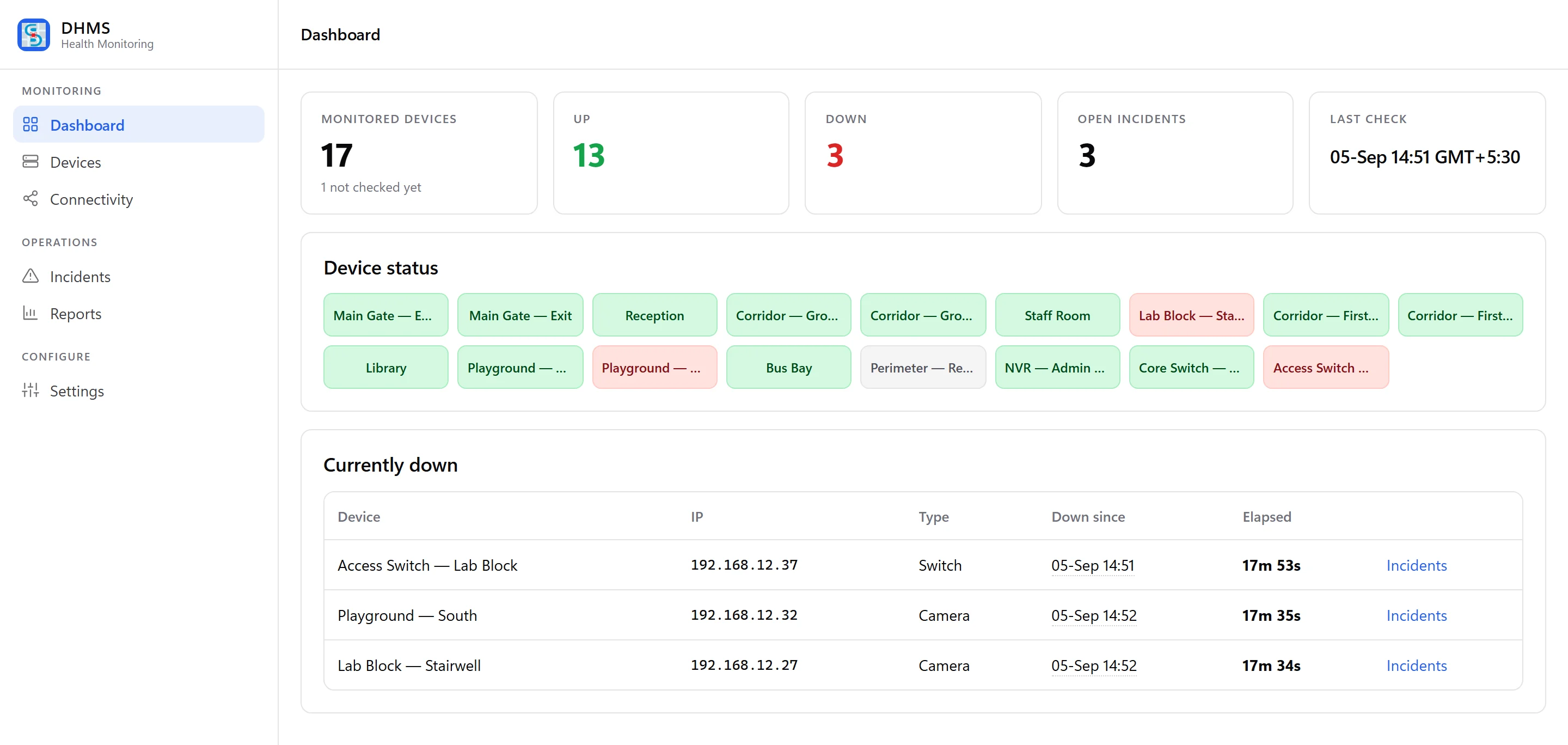
The DHMS dashboard: 17 monitored devices, 13 up, 3 down, 3 open incidents, with a status tile for every camera, recorder and switch.

The problem

Nobody tells you a camera has stopped.You find out when it is already too late.

You have already paid for the cameras, the recorder and the cabling. What you do not have is any way of knowing, today, whether all of it is doing its job.

01

You find out too late

The camera at the back gate stopped recording three weeks ago. Nobody noticed until there was an incident and the footage simply was not there.

The technical reason

Most installations have no health signal at all. A camera that has lost power, dropped off the network or had its stream reconfigured looks identical to one that is working — until someone opens the playback.

02

The recorder fails quietly

A full disk, a failed drive, or a recording schedule that silently stopped. The live screens still show video, so everything looks perfectly normal.

The technical reason

Live view and recording are separate paths inside an NVR. A disk that has failed SMART checks, or an overwritten retention window, breaks recording while leaving the live feed untouched.

03

Every check is a site visit

Someone has to physically walk the premises to know what is working. That costs a day — and it only tells you about that one day.

The technical reason

Without continuous polling there is no history. A manual audit is a single sample; it cannot tell you that a camera drops off every night at 2am and returns by morning.

04

No proof your AMC is honoured

You pay for maintenance every year. You have no record of what was down, for how long, or how quickly anyone actually fixed it.

The technical reason

Fault records live in WhatsApp messages and phone calls. Without timestamped detection and closure, downtime and response time cannot be measured, only argued about.
The solution

Turn a wall of screensinto one honest answer.

DHMS sits on top of the equipment you already own. No new cameras, no new cabling — one small program that watches the network and reports what it finds.

Nothing is replaced. Nothing is rewired. And no video ever leaves your premises.

01  ·  For the business owner

Know every site without visiting one

One screen showing every location you run, and an honest status against each device. Open it on your phone at 9pm and know exactly where you stand.

02  ·  For your security team

Be told, instead of asked

The moment a device stops responding, the right person is notified and a clock starts running. Nobody has to remember to check anything.

03  ·  For Digitech, your service partner

Fixed before you call

We see the fault the moment it happens — often reaching your site already knowing which device failed and what it will take to put right.

How it works

Four steps.Then it runs itself.

01

One small install, once

A lightweight program goes onto any Windows PC you already have at the site — the one at reception is fine. Ten minutes, no new hardware, and nothing changes on your cameras.

02

It watches your network quietly

Every camera, recorder and switch on the local network is checked continuously, around the clock. It reports status only — no video ever leaves your premises.

03

The system works out what is actually wrong

A whole floor going dark is almost always one failed switch, not twenty broken cameras. You are told the cause, once — not twenty separate alarms at three in the morning.

04

Someone is told, and the clock starts

The fault is assigned, tracked and timed until it is closed. "We fixed it quickly" stops being a claim and becomes a number on your monthly report.

What we watch

Not just whether it is switched on.Whether it is doing its job.

Six things, checked continuously, on the equipment you already own.

01

Cameras

Reachable, streaming, and pointed where they were installed to point.

How

Continuous reachability checks plus ONVIF interrogation for stream state, resolution and device identity — matched on hardware address, so a changed IP is not mistaken for a new camera.

02

Recorders and disks

Whether the NVR is up, and whether it is genuinely still writing footage.

How

Vendor APIs for Hikvision and Dahua report disk health, capacity and per-channel recording state. An unreadable recorder is flagged as a monitoring gap, never silently passed as healthy.

03

Network switches

The equipment everything else depends on, watched first.

How

SNMP polling for port status and uptime on managed switches, which lets a whole branch of failures be attributed to the one device that actually caused them.

04

Recording continuity

Not just that the recorder is on, but that yesterday exists on disk.

How

A camera's recording state is held by the recorder, not the camera, so the two are correlated on every cycle — which is how a live-but-not-recording camera is caught.

05

Power and connectivity

Outages, network drops, and the devices that never came back afterwards.

How

Site-wide loss is recognised as one event rather than every device failing at once, and each device is tracked individually as it returns — the ones that do not are what matter.

06

The site as a whole

One number for the location, so you can compare this month with last.

How

Per-device uptime aggregates into a site availability figure over any window, with every incident retained individually so the number can always be broken back down.

See it

Nothing to learn.Open it and you already know.

Green is fine. Red needs someone. That is the whole training course.

Dashboard showing 17 devices as coloured tiles, with three currently down listed underneath.
Every device, one screenEach tile is one camera, recorder or switch. Colour tells you the answer before you read a word.
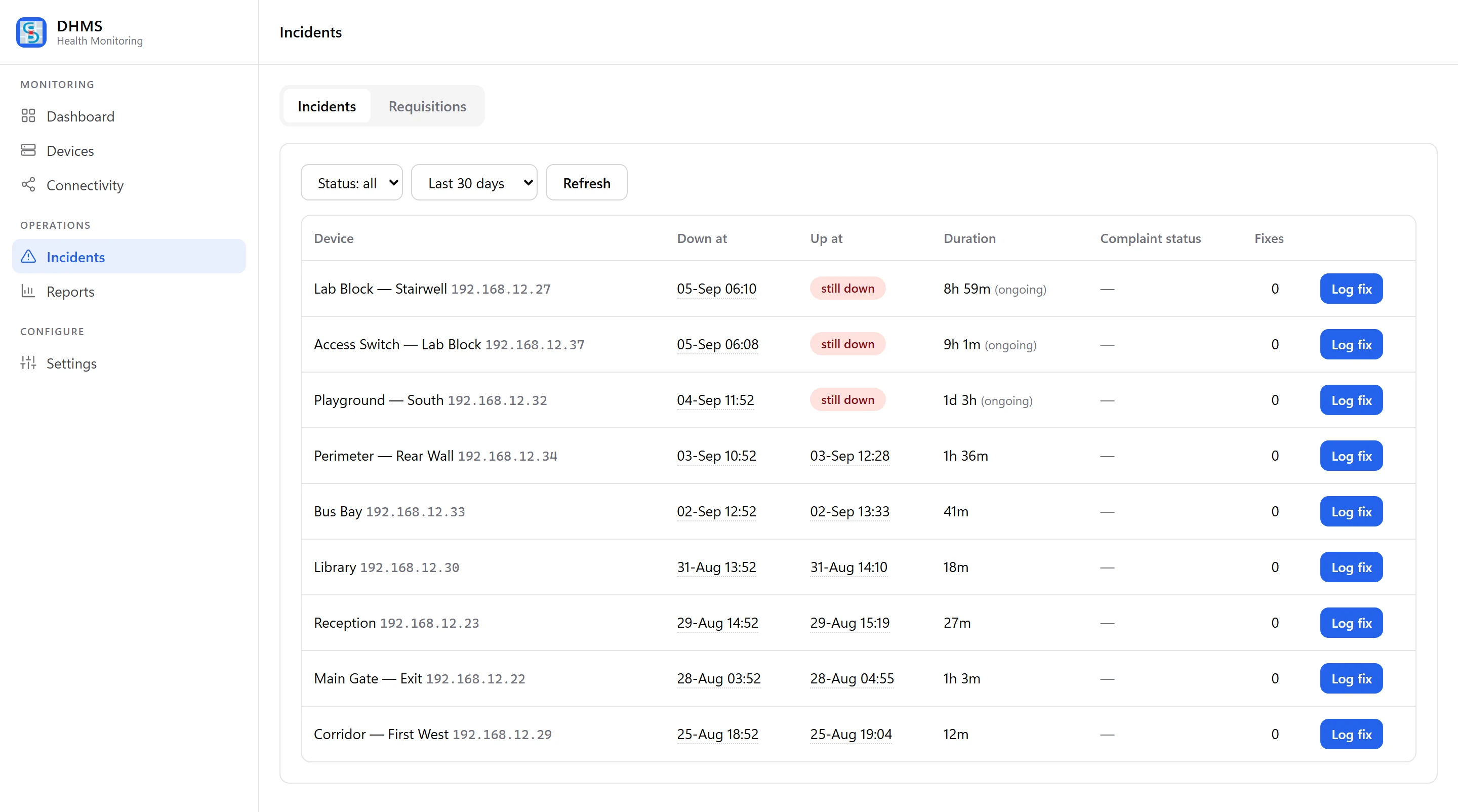
Incident list with the time each device went down, when it came back, and how long it was out.
What happened, and whenEvery fault timed from the moment it started. Three still down, the rest closed with a duration against each.
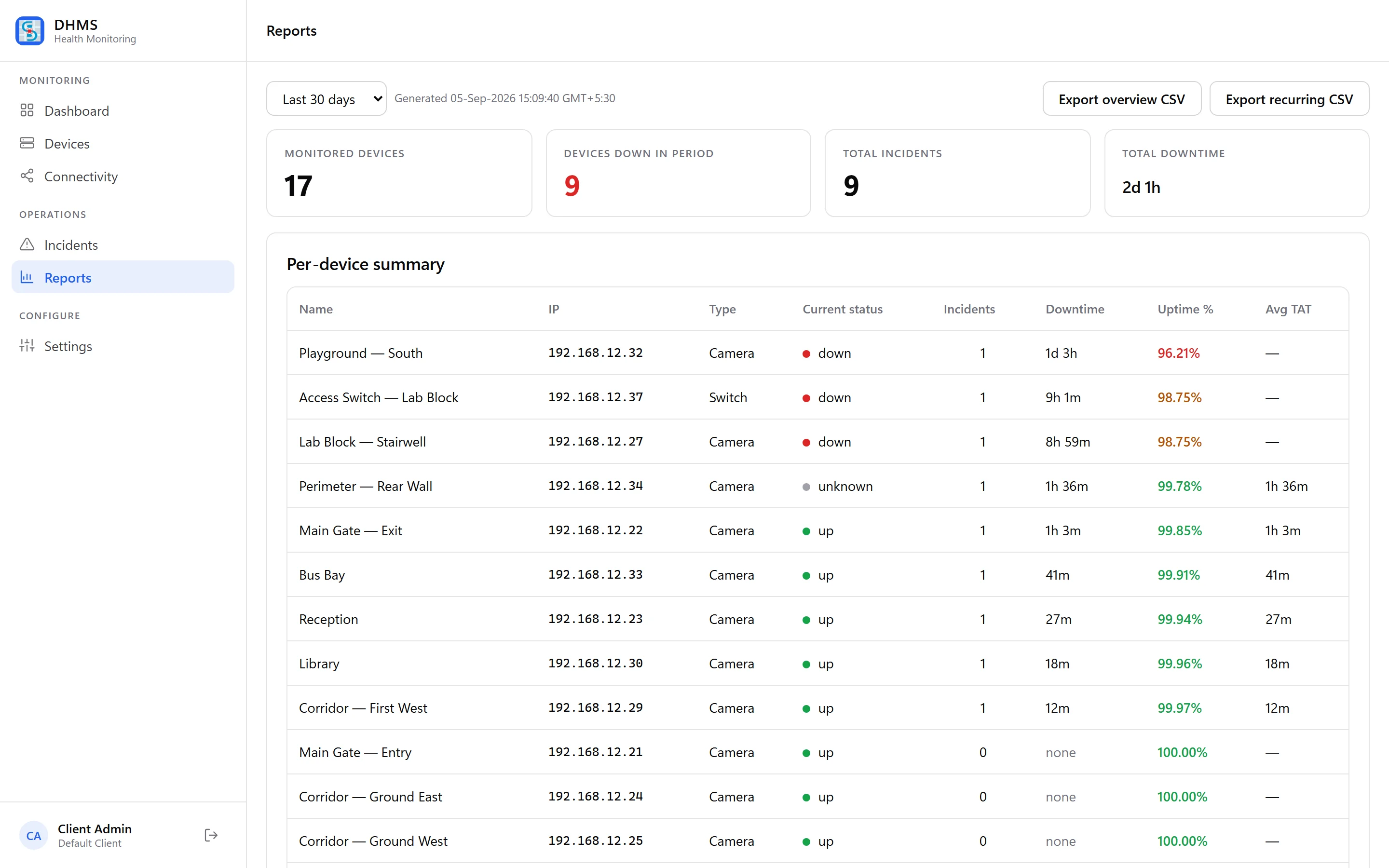
Report showing uptime percentage, total downtime and average turnaround time for each device over 30 days.
Proof, monthlyUptime per device, total downtime and how fast each fault was closed. Exportable.

Most security systems tell you everything is fine.This one tells you when it isn't.

If you sign off the security budget, you are currently paying for equipment whose condition nobody can describe. DHMS turns that into three numbers you can act on.

What percentage of the month your cameras were genuinely recording, how many faults there were, and how long each one took to fix. That is the difference between believing your site is covered and being able to show it.

01

Uptime you can show

A figure per site and per device, over any period you ask for.

02

Faults, counted

Every incident recorded with the moment it started and the moment it closed.

03

Response, measured

How long each fix actually took — so service quality stops being an opinion.

What you get

Everything included.On every plan.

01

Every device, one screen

All your sites and all your equipment in a single view, on any browser.

02

Faults found in minutes

Checks run continuously and a real fault is confirmed before you are disturbed.

03

The cause, not the noise

One failed switch reports as one problem, not as forty dead cameras.

04

Response times measured

Every fault timed from detection to closure, so service becomes a number.

05

Uses the network you have

No new cabling, no new hardware, no changes to your existing cameras.

06

Your footage stays yours

Only status information leaves the site. No video, ever.

07

Reports without asking

A monthly uptime and response summary, generated for you.

08

Built for the engineer too

A phone view for whoever is actually on site fixing it.

Pricing

Priced per site.Every feature on every plan.

No feature tiers and no per-camera counting — a site with eighty cameras costs the same as a site with twelve. The only thing that changes is how long you commit for.

Monthly ₹2,499 per site, per month Complete flexibility. Stop whenever you like.
Quarterly ₹6,749 per site, per quarter Works out at ₹2,250 a month. Saves ₹2,992 a year.
Custom Let's talk five sites or more Multi-site rollouts, your own branding, on-site response.

Prices are per site and exclude GST. Running several locations, or already an AMC customer with Digitech Services? Talk to us — there is room to move on all of the above.

FAQ

The questionseverybody actually asks.

Compatibility
Will this work with the cameras I already have? Read

Almost certainly yes. DHMS works with any IP camera, NVR or managed switch on your network, whatever the brand — including Hikvision, Dahua, CP Plus and most others. Nothing is replaced and nothing is rewired. If you are on very old analogue cameras with no network recorder at all, tell us and we will say so honestly.

Privacy
Can you see my camera footage? Read

No. This is the question we get most and the answer is absolute: no video ever leaves your premises. DHMS sends status information only — whether a device answered, whether the recorder is writing, whether a disk is healthy. There is no video path out of your site, by design.

Installation
What do I actually have to do to get started? Read

One small program is installed on a Windows PC that is already at your site and stays switched on. It takes about ten minutes. It then finds the devices on your network by itself and starts reporting. There is no new hardware to buy and no downtime for your existing system.

Alerts
How will I know when something breaks? Read

The dashboard shows it immediately, and the people you nominate are notified. If nobody acknowledges a fault, it escalates automatically to the next person up — so a problem raised at midnight cannot quietly go unread until Monday.

Sites
I have several branches. Can I see them all together? Read

Yes. Each location is monitored separately and rolls up into one view, so you can compare branches and see which needs attention. Pricing is per site, and there is a custom plan once you are running five or more.

Commitment
What if I want to stop? Read

The monthly plan can be stopped at the end of any month. Nothing we install changes your existing security equipment, so removing DHMS leaves your cameras and recorder exactly as they were.

Join the DHMS waitlist